
This is an attempt to make some sense of the rat’s nest of wiring for my computer, television, external drives, digital microscope, printers and anything else tossed into the mix. The point of this page is to make the confusing less so .. this way I can refer back to it.
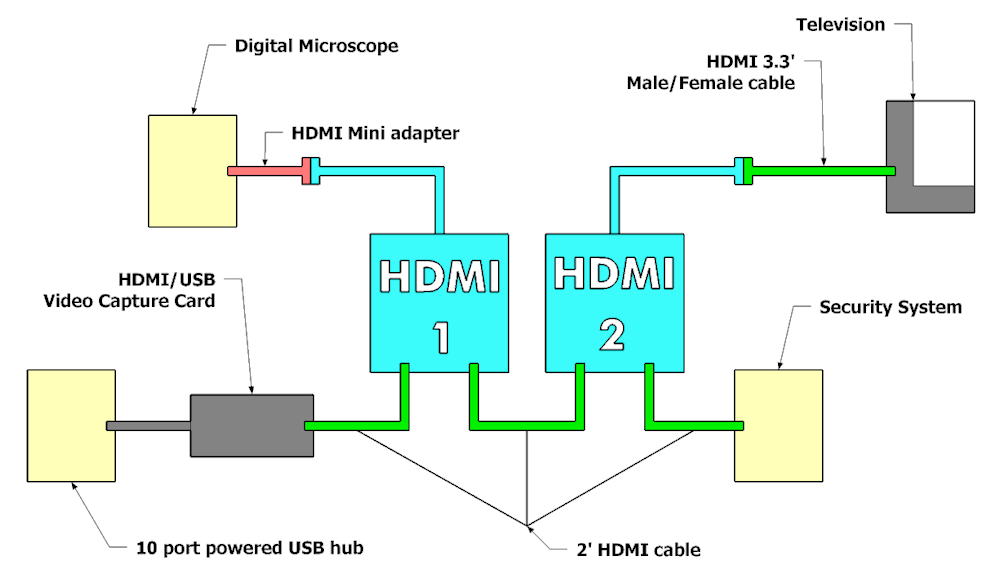
HDMI – What I want/need is to display what my Andonstar digital microscope8 is recording to both the television/monitor and also to my computer via two HDMI switches. The digital microscope has a female HDMI port which meant I needed a Mini HDMI to HDMI Adapter1 that is a Mini HDMI male to HDMI female adapter cable. This connects to a HDMI switch (1)2 via the switch’s input male fitting. This switch feeds a HDMI/USB Video Capture Card3 or HDMI switch (2)2 depending on the switch selection. HDMI switch (2)2 feeds the Television/Monitor depending with input from either the signal from HDMI switch(1)2 or the Home Security System6 depending on the switch selection. Short 2′ HDMI cables4 are used to connect to the female jacks on the HDMI switches. HDMI switch(2)2 outputs to the Television7 via a 3.3′ HDMI cable5.
- JSAUX Mini HDMI to HDMI Adapter
- HDMI Switch 2 in 1 Out 4K@60Hz, WARRKY
- Audio Express AXHDCAP 4K HDMI Video Capture Card
- Capshi 2ft 8K 4K@120Hz HDMI Cable
- JSAUX HDMI Extension Cable 3.3FT
- Hiseeu Wireless Security Camera System
- VIZIO D-Series 40” 1080p Class Smart TV
- Andonstar AD249S-M 10.1 Inch HDMI Digital Microscope
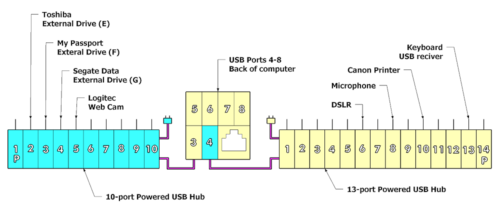
USB – I got really tired of trying to access the six USB ports on the back of the computer so I put in a 10-port powered USB hub1 to address that .. now the USB ports are visible and easily accessed.
The two USB hubs are positioned left and right of the computer like in the illustration … the arrangement may change as to what plugs into what port .. reality being sometimes different than a drawing.
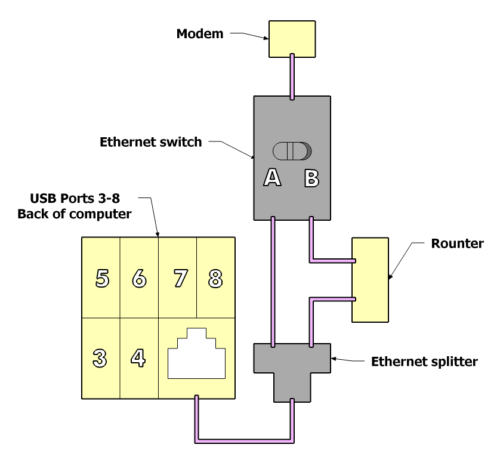
Ethernet – this was relatively cheap so this is a bit of me amusing myself. I have had problems in the past where my upload speed drops to almost nothing. I suspect that I need to replace the modem .. suspect .. don’t know for sure. I have been running an internet speed check occasionally, Speedtest by Ookla – The Global Broadband Speed Test. I like this website as it records the Download and Upload speeds which you can download as a CSV file. When a modem is suspected to be at fault you need to run the speed test with the router (modem -> router -> computer) and without the router, just the modem (modem -> computer). I got this ethernet splitter / network switch1 so I can run a speedtest both with and without the modem.
“RJ45 Ethernet Splitter : You can easily convert the RJ45 connection to two RJ45 sockets, allowing two computers to share high-speed DSL, cable modem and Ethernet ports without the need for a router(Only one port work at a time, not supports two devices online simultaneously“
Since the Ethernet switch2 will only pass a signal from the Modem or Router depending on which way the switch is thrown it appears to me that the Ethernet splitter will work since only a single device will be connected.